BHARAT AI ERP · BUSINESS OPERATIONS

ERP Software

Connect purchase, sales, production, accounts and people operations in a business system built around your daily work. Bharat AI ERP helps manufacturers, distributors and institutions review activity across departments, with role-based dashboards and AI forecasts that turn recorded business data into clearer questions and better-informed planning.
● ● ●
ERP Software
CONCEPT PREVIEW

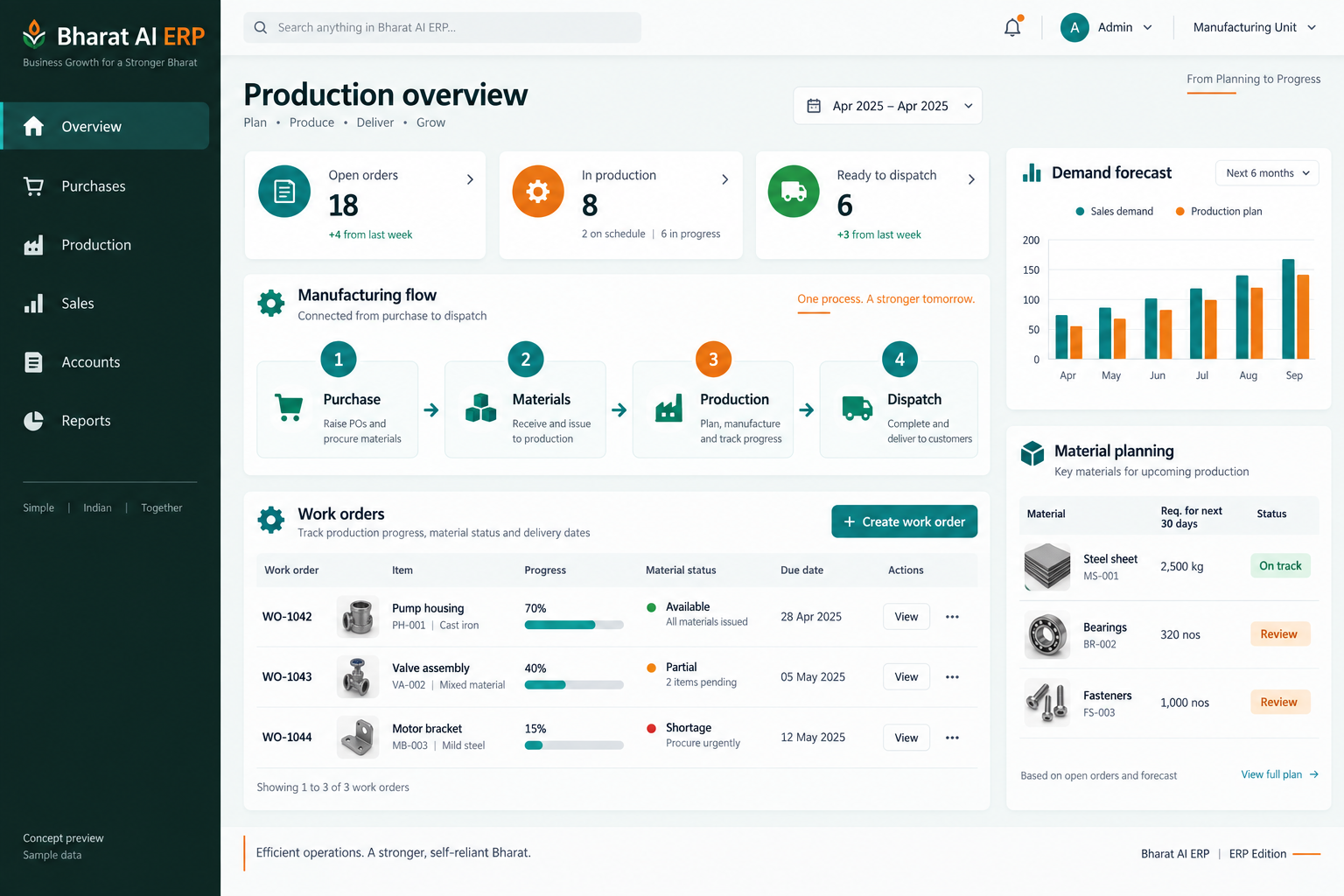
Illustrative interface with sample data. Select the image to explore it at full size.

BUILT FOR YOUR BUSINESS

A better fit for your daily work.

Manufacturing businesses
Distributors and wholesalers
Institutions with multiple departments
Owners and operations managers

Departments work from different numbers

Purchasing, production and accounts often maintain separate working sheets. Connecting their records helps teams discuss the same activity and reduces the effort of tracing information through several people.

Management reports arrive late

Managers need to understand current operations before the next purchase or production decision. Role-based dashboards put relevant activity in front of the people responsible for reviewing it.

Planning depends on manual summaries

Demand, expenses and cash movements can be difficult to interpret across many records. Forecasts and plain-language questions help teams identify where a closer review is useful.

SOFTWARE CAPABILITIES

Everything your team needs, connected.

01

Purchase operations

Bring purchasing activity into the wider business record so it can be reviewed alongside sales, production and accounts.

02

Sales operations

Manage sales information as part of the same operational picture.

03

Production management

Connect production activity with purchasing and sales requirements.

04

Accounts and GST

Keep accounts and GST-related business records connected to operations.

05

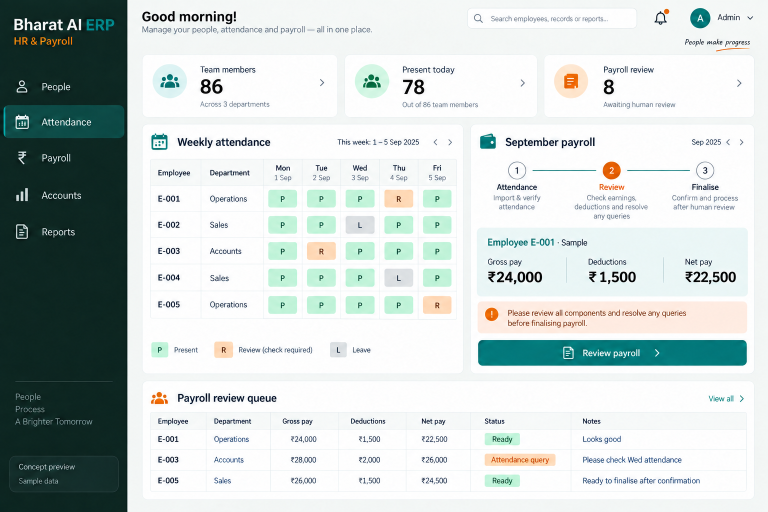
HR and payroll

Include HR, attendance and payroll within the back-office setup where required.

06

Role-based dashboards

Give each team a relevant view of the information it uses.

HOW IT WORKS

From the first task to a clearer daily picture.

01

Map the business cycle

Choose a common order or production scenario and identify the purchase, sales, accounts and staff records involved. Use it as the reference for the demonstration.

02

Prepare the working data

Review master records and opening information before daily transactions begin. Resolve duplicate names and inconsistent identifiers so connected reports start from a useful foundation.

03

Record department activity

Have each team enter the transactions within its responsibility. Check the agreed handover points so downstream staff understand which information is ready to use.

04

Review operational dashboards

Managers inspect the activity relevant to their role, investigate exceptions and discuss actions with the responsible team. Use the source records to explain unexpected figures.

05

Plan the next period

Review demand and cash-flow forecasts alongside recent activity. Make planning decisions with department input and revisit the assumptions as business conditions change.

AI ASSISTANCE

Useful insights. Your team in control.

Use forecasts and alerts to guide your review, with people making the final decisions.

Demand and cash-flow forecasts

Use business history to support purchasing, production and cash planning. Treat forecasts as estimates and review them alongside current commitments and the team’s knowledge of upcoming changes.

Questions in Tamil or English

Ask plain-language questions about recorded business data to make analysis more approachable. Confirm the supported questions and available data sources with examples from your management meetings.

Expense anomaly detection

Highlight expense patterns that deserve a closer look. An unusual entry is a prompt for investigation; staff should inspect its context before deciding whether a correction is necessary.

REPORTS AND VISIBILITY

A clear view of what matters.

Purchase and sales review

Compare recorded business activity across the period. Agree the views and breakdowns needed by purchasing, sales and management during the demo.

Production overview

Review production records alongside the operational questions your supervisors need to answer. Check the exact output and material reporting scope with sample work.

Accounts and expense review

Examine accounts information and investigate unusual expense patterns. Confirm the report formats used by your accounts team as part of configuration.

Management outlook

Bring role-based dashboards, plain-language analysis and forecasts into the same review conversation to identify the next questions and operational priorities.

EQUIPMENT AND SETUP

Made to work with the right tools.

Bring your existing equipment details. We’ll review compatibility, connectivity and the modules needed for your installation.

YOUR SETUP CHECKLIST
GETTING STARTED

A practical plan for moving forward.

01

Define the first scope

Identify the departments and workflows that need to go live first. Agree which records belong in the initial project and which requirements need further discussion.

02

Prepare and reconcile data

Clean master lists and opening records, then check a representative sample with each department. Resolve inconsistent units, identifiers and names before they affect connected reports.

03

Validate a complete scenario

Walk through a realistic business cycle with the relevant teams. Confirm the account treatment, required documents, dashboard information and staff responsibilities at each stage.

04

Roll out by responsibility

Train people on their daily work and review tasks. Agree the rollout sequence, support contact and first operating-period checks before expanding to further departments.

COMMON QUESTIONS

Before you choose your software.

Is the ERP only for factories?

No. Bharat AI ERP is intended for manufacturers, distributors, institutions and hospitality businesses. The starting point is your workflow, with the relevant editions and modules agreed during the demo.

Yes. Role-based dashboards are part of the product. Explain what owners, managers and operators need to see so the demonstration can show an appropriate working view.

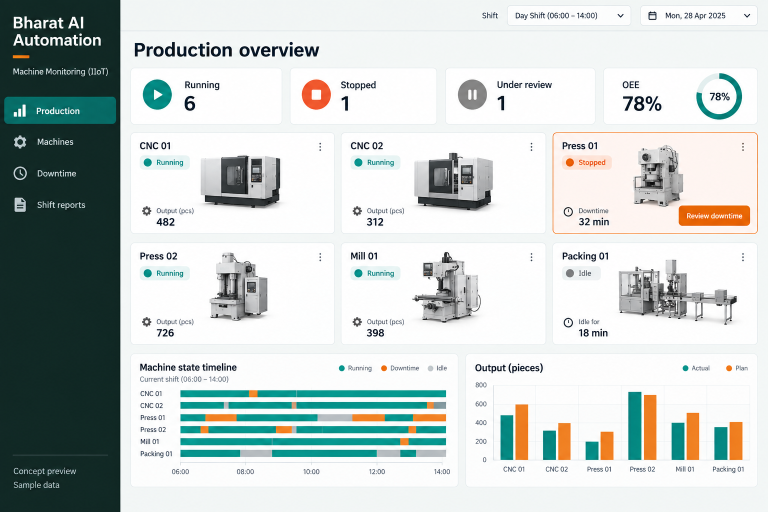
Bharat AI Automation includes a connection to Bharat AI ERP. The machine data, exchange points and required hardware should be discussed and checked for your project.

Its usefulness depends on the available records and configured questions. Test representative Tamil or English questions in the demo and review the source data behind important decisions.

ERP is quoted to your requirements. Departments, data preparation, hardware, integrations and training affect the scope, so agree a project-specific rollout and quotation after the workflow review.

LET’S TALK ABOUT YOUR BUSINESS

See your workflow in action.

Bring your real tasks and questions. We’ll use them to discuss the right configuration, equipment and rollout.

A USEFUL STARTING POINT
KEEP EXPLORING

More ways to support your business.

BHARAT AI ERP

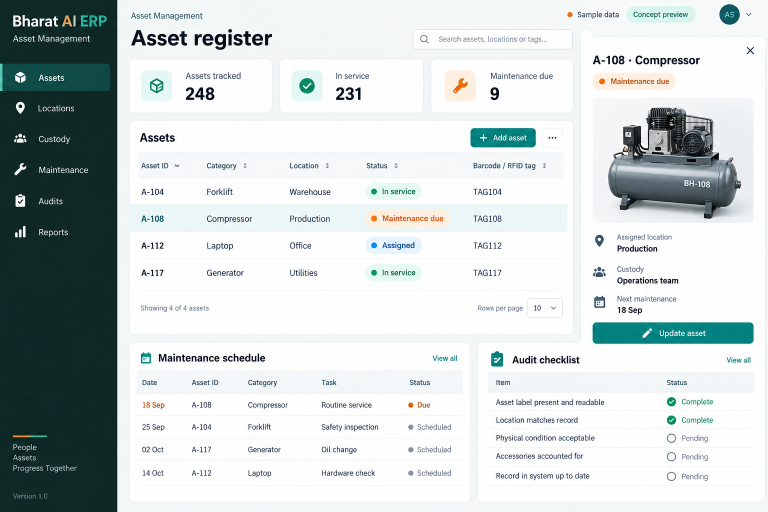
Know which assets your organisation holds, where they are located and who is responsible for them.

BHARAT AI ERP

Keep employee information, attendance and payroll within the same back-office working process.

BHARAT AI AUTOMATION

Understand what your machines produced, when they stopped and where the next investigation should begin.