/
/
/
HR & Payroll
BHARAT AI ERP · HR & PAYROLL

HR & Payroll Software

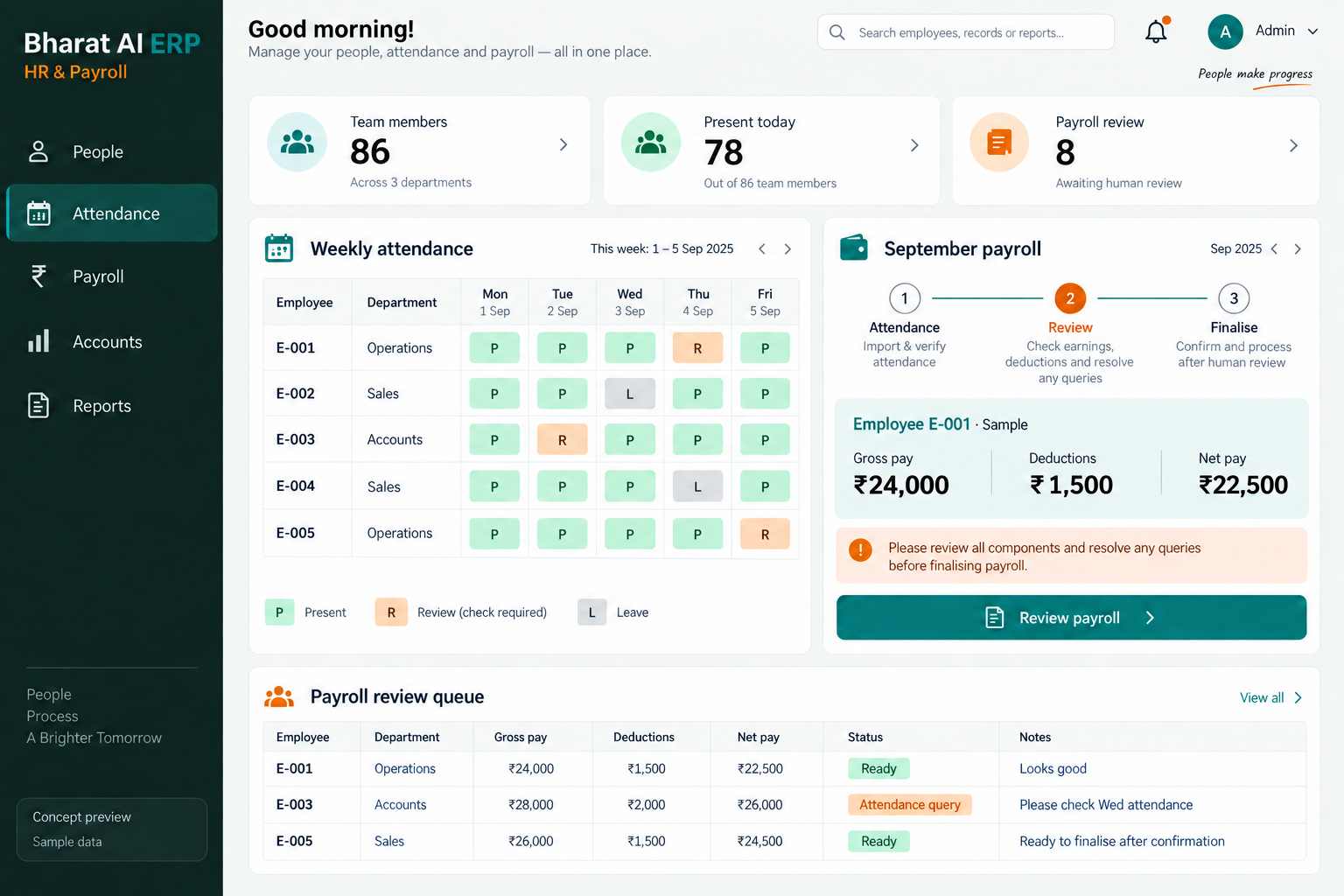
Keep employee information, attendance and payroll within the same back-office working process. Bharat AI ERP helps businesses prepare a more organised payroll review, give HR and management relevant dashboards and connect people operations with the wider business, with configuration based on the attendance sources and pay rules you provide.
● ● ●
HR & Payroll Software
CONCEPT PREVIEW

Illustrative interface with sample data. Select the image to explore it at full size.

BUILT FOR YOUR BUSINESS

A better fit for your daily work.

Factory HR departments
Distributor and office teams
Schools and institutions
Payroll and accounts administrators

Employee records are duplicated

HR and accounts can hold different versions of an employee list. A shared working record gives teams a clearer reference when reviewing attendance and preparing information for payroll.

Attendance checks delay preparation

When attendance information arrives from several sources, payroll preparation starts with reconciliation. An agreed attendance process helps the team identify incomplete information before the pay period is reviewed.

Managers need a relevant view

A complete payroll working sheet is not the right view for every person. Role-based dashboards and agreed permissions help each team focus on the information relevant to its responsibilities.

SOFTWARE CAPABILITIES

Everything your team needs, connected.

01

HR records

Maintain the employee information needed for your HR process.

02

Attendance management

Bring attendance into the people-operations workflow.

03

Payroll preparation

Use the payroll module with the employee and attendance information relevant to the period.

04

Accounts connection

Include payroll within the wider ERP and accounts discussion where required.

05

Role-based dashboards

Provide HR, payroll staff and management with views suited to their review tasks.

06

Business reporting context

Review HR and payroll alongside the wider business where included in your ERP project.

HOW IT WORKS

From the first task to a clearer daily picture.

01

Prepare employee records

Clean the employee list and confirm the information used for payroll. Identify who can enter changes and who reviews them before they affect the next pay period.

02

Bring in attendance

Use the agreed attendance source and collection method. Check a representative sample so missing dates, identifiers or mismatched employee names are found early.

03

Review period inputs

Have the responsible team verify the attendance and payroll inputs for the period. Resolve questions with HR before treating the working data as ready for calculation.

04

Check payroll results

Compare representative calculations with your approved working examples. Review the required reports and accounts handover with the people responsible for each step.

05

Complete the period review

Use the agreed payroll and attendance views to check the completed period. Record implementation questions and adjust the configured process with the support team when needed.

AI ASSISTANCE

Useful insights. Your team in control.

Use forecasts and alerts to guide your review, with people making the final decisions.

Plain-language data questions

The ERP supports questions in Tamil and English. Discuss which HR or payroll questions are appropriate for your configured records and access permissions, then test them with sample data.

Unusual expense review

Where payroll-related expenses are included in accounts, discuss how anomaly detection can support a review. An alert should lead to checking records and context, not an automatic judgment about an employee.

Cash-flow planning context

ERP cash-flow forecasts can support the wider management planning process. Confirm how the agreed payroll information contributes before relying on any particular projection for a pay period.

REPORTS AND VISIBILITY

A clear view of what matters.

Employee record review

Check the working employee information used in the configured process. Confirm the required fields and team-specific views during the demonstration.

Attendance period review

Review attendance information before payroll preparation. Ask the team to demonstrate the exact attendance summary and exceptions your administrators need.

Payroll working review

Inspect the period’s payroll output against your sample calculations. Agree the report format and the review responsibilities with payroll and accounts staff.

Management dashboard

Discuss the people-operations information managers need alongside other ERP activity. Check access and report scope with representative user roles.

EQUIPMENT AND SETUP

Made to work with the right tools.

Bring your existing equipment details. We’ll review compatibility, connectivity and the modules needed for your installation.

YOUR SETUP CHECKLIST
GETTING STARTED

A practical plan for moving forward.

01

Document the pay process

Provide employee categories, attendance sources and reviewed payroll examples. Use them to define the calculation scope and required working reports.

02

Prepare employee and period data

Resolve duplicate names and inconsistent employee identifiers. Check opening records and attendance samples so the first working period begins with verified information.

03

Run a representative comparison

Compare selected payroll examples with the team’s established calculations. Include the variations that matter to your business and discuss any rules needing further configuration.

04

Train each responsible team

Show HR, payroll reviewers and accounts staff their respective tasks. Agree the rollout period, support arrangements and escalation process for calculation questions.

COMMON QUESTIONS

Before you choose your software.

Are HR, attendance and payroll available together?

Yes. These are included in the Bharat AI ERP offering. The demo should show the workflow relevant to your business and confirm the employee information and calculation setup required.

Device compatibility needs to be checked. Share the model, export format and current process so the team can confirm the supported method instead of assuming a direct connection.

Do not assume that a particular filing or portal submission is included. Share each required output with the team and verify the scope with your payroll advisers during configuration.

Bring those rules and sample calculations to the demo. Their exact handling should be confirmed against your payroll requirements before the project scope and configuration are agreed.

The platform includes staff permissions and role-based dashboards. Demonstrate representative user roles so the access appropriate to HR, payroll and management can be reviewed before rollout.

LET’S TALK ABOUT YOUR BUSINESS

See your workflow in action.

Bring your real tasks and questions. We’ll use them to discuss the right configuration, equipment and rollout.

A USEFUL STARTING POINT
KEEP EXPLORING

More ways to support your business.

BHARAT AI ERP

ERP

Connect purchase, sales, production, accounts and people operations in a business system built around your daily work.

BHARAT AI ERP

Know which assets your organisation holds, where they are located and who is responsible for them.

BHARAT AI ERP

Bring reservations, check-in, billing and occupancy reporting into one organised workflow for rooms, halls and lodges.