/
/
/
Pawn Broking
BHARAT AI FINANCE · PAWN BROKING

Pawn Broking Software

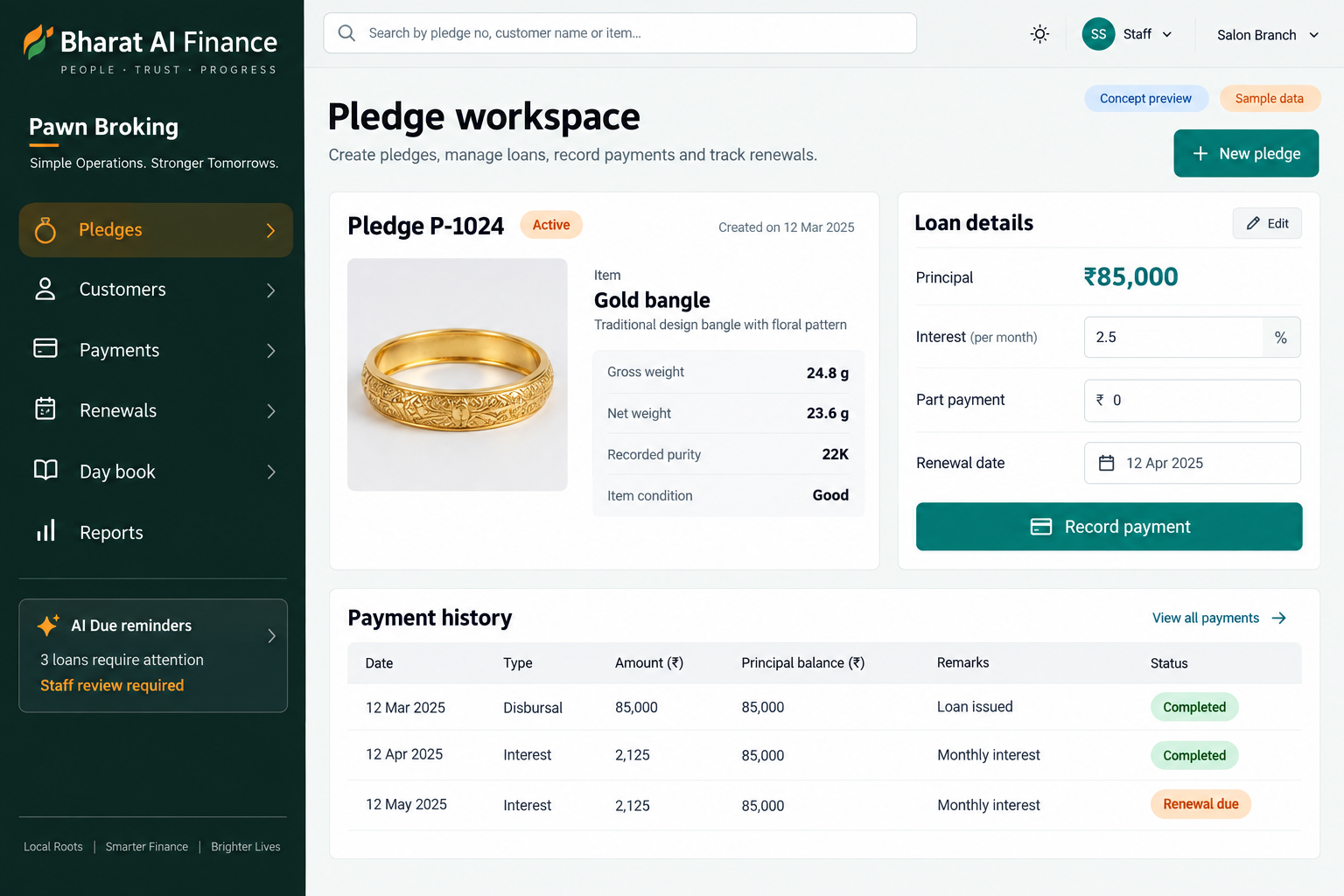
Keep pledged items, customer records, loan entries and collections connected throughout the loan lifecycle. Bharat AI Finance supports pawn shops and gold loan lenders with item weight and photo records, interest calculations, part payments, renewals and overdue alerts, helping staff answer enquiries from a clear transaction history.
● ● ●
Pawn Broking Software
CONCEPT PREVIEW

Illustrative interface with sample data. Select the image to explore it at full size.

BUILT FOR YOUR BUSINESS

A better fit for your daily work.

Pawn broking businesses
Gold loan counters
Collection and renewal teams
Owners reviewing loan books

Pledge details are hard to retrieve

A customer enquiry may require the loan register, a photograph and separate KYC paperwork. Connecting these records gives staff a clearer view of the pledged item and the associated loan.

Part payments complicate follow-up

When payment notes and interest workings sit in different places, staff can struggle to explain a current balance. A connected loan history makes the recorded sequence easier to review.

Overdue records need timely attention

Busy counters can miss loans that need a renewal conversation or overdue review. Alerts help create a practical worklist, while staff retain responsibility for checking details and taking action.

SOFTWARE CAPABILITIES

Everything your team needs, connected.

01

Customer and KYC records

Maintain customer details and KYC records with the business information used during loan entry.

02

Pledge entry with weight

Record the pledged item’s weight and identifying information as part of loan entry.

03

Item photographs

Keep a photo with the pledge record so staff have a visual reference during an enquiry.

04

Interest calculation

Calculate interest within the loan workflow using the method agreed for your setup.

05

Part payments and renewals

Record part payments and manage renewals in the context of the existing loan.

06

Receipts, day book and alerts

Issue collection receipts, review daily activity and follow overdue or auction alerts.

HOW IT WORKS

From the first task to a clearer daily picture.

01

Identify the customer

Locate or create the customer record and review the KYC information needed by your business. Confirm contact details before the record is used for reminders.

02

Create the pledge record

Enter the item information, weight and photograph alongside the loan details. Have counter staff check the record before completing the loan-entry process.

03

Record collections

Retrieve the loan, review the interest calculation and enter the payment against the correct record. Provide a collection receipt that staff can find again later.

04

Handle a renewal

Review the existing loan and payment history before processing a renewal. Test the relevant calculation examples and staff responsibilities during training.

05

Review the loan book

Check pending dues, overdue alerts and daily collections. Plan customer conversations using verified records and review forecasted collections as an aid to operational planning.

AI ASSISTANCE

Useful insights. Your team in control.

Use forecasts and alerts to guide your review, with people making the final decisions.

Overdue risk attention

Use alerts to identify loan records requiring staff attention. Review the recorded dates, payment history and customer conversation before deciding how the business should proceed.

Due reminders on WhatsApp

Support timely customer follow-up with due reminders. Agree the communication wording, contact verification and appropriate reminder process before enabling messages for your business.

Collection outlook

Review forecasts and plain-language summaries to understand collection patterns. The output supports planning and does not replace checking individual loan records or the day book.

REPORTS AND VISIBILITY

A clear view of what matters.

Loan and pledge record

Review the customer, item information and recorded loan activity together when responding to a counter enquiry or checking an entry.

Daily collection activity

Use receipt and day-book records to understand the day’s recorded collections and investigate entries that need clarification.

Pending and overdue review

Identify loans needing follow-up and organise a staff review. Confirm required date filters and report columns during the demonstration.

Renewal and payment history

Inspect how payments and renewals relate to the original loan. Discuss the exact statement format needed for your counter workflow.

EQUIPMENT AND SETUP

Made to work with the right tools.

Bring your existing equipment details. We’ll review compatibility, connectivity and the modules needed for your installation.

YOUR SETUP CHECKLIST
GETTING STARTED

A practical plan for moving forward.

01

Review real loan examples

Bring examples covering a new pledge, part payment, overdue record and renewal. Use these to agree the scope and required calculation method.

02

Prepare existing records

Organise customer details, opening loans and pledge references before import. Reconcile a sample of balances and item records against your current system.

03

Check the counter process

Practise photo capture, weight entry, receipt handling and customer lookup. Confirm any equipment compatibility before deciding what hardware needs to be supplied.

04

Train and review

Train staff with realistic payment and renewal scenarios. Agree the day-end checks, rollout sequence and support arrangement that fit your operating hours.

COMMON QUESTIONS

Before you choose your software.

Can a pledge include both weight and a photograph?

Yes. Pledge entry with weight and photo is a core capability. Use the demo to check how staff capture, review and retrieve those details for your typical items.

Yes. Part payments and renewals are included in the finance workflow. Bring sample calculations so the team can demonstrate how your specific payment situations will be handled.

Bring the equipment details to the discussion. The entry method and any direct device connection need to be checked; do not assume every scale communicates with the loan screen.

It helps staff identify a record for review. It is not an instruction to proceed automatically; the business should check the record and its approved process before taking action.

Discuss the available export, pledge identifiers, customer details and opening balances. Agree the migration scope and reconcile sample loans before the new system becomes the everyday working record.

LET’S TALK ABOUT YOUR BUSINESS

See your workflow in action.

Bring your real tasks and questions. We’ll use them to discuss the right configuration, equipment and rollout.

A USEFUL STARTING POINT
KEEP EXPLORING

More ways to support your business.

BHARAT AI FINANCE

Bring member records, groups, tickets, auctions and instalment collections into one working system.

BHARAT AI AGENTS

Give customers a helpful first response on WhatsApp, even when your staff are serving someone else.

BHARAT AI ERP

ERP

Connect purchase, sales, production, accounts and people operations in a business system built around your daily work.