/
/
/
Electronics
BHARAT AI POS • ELECTRICAL & ELECTRONICS

Electronics Billing and Warranty Tracking Software

Connect model stock, serial numbers and after-sales service with Bharat AI POS for electronics retailers. Brand and model-wise inventory, serial and warranty tracking, service job cards, and EMI and exchange billing help showrooms organise the details behind each sale and customer follow-up.
● ● ●
Electronics Billing and Warranty Tracking Software
CONCEPT PREVIEW

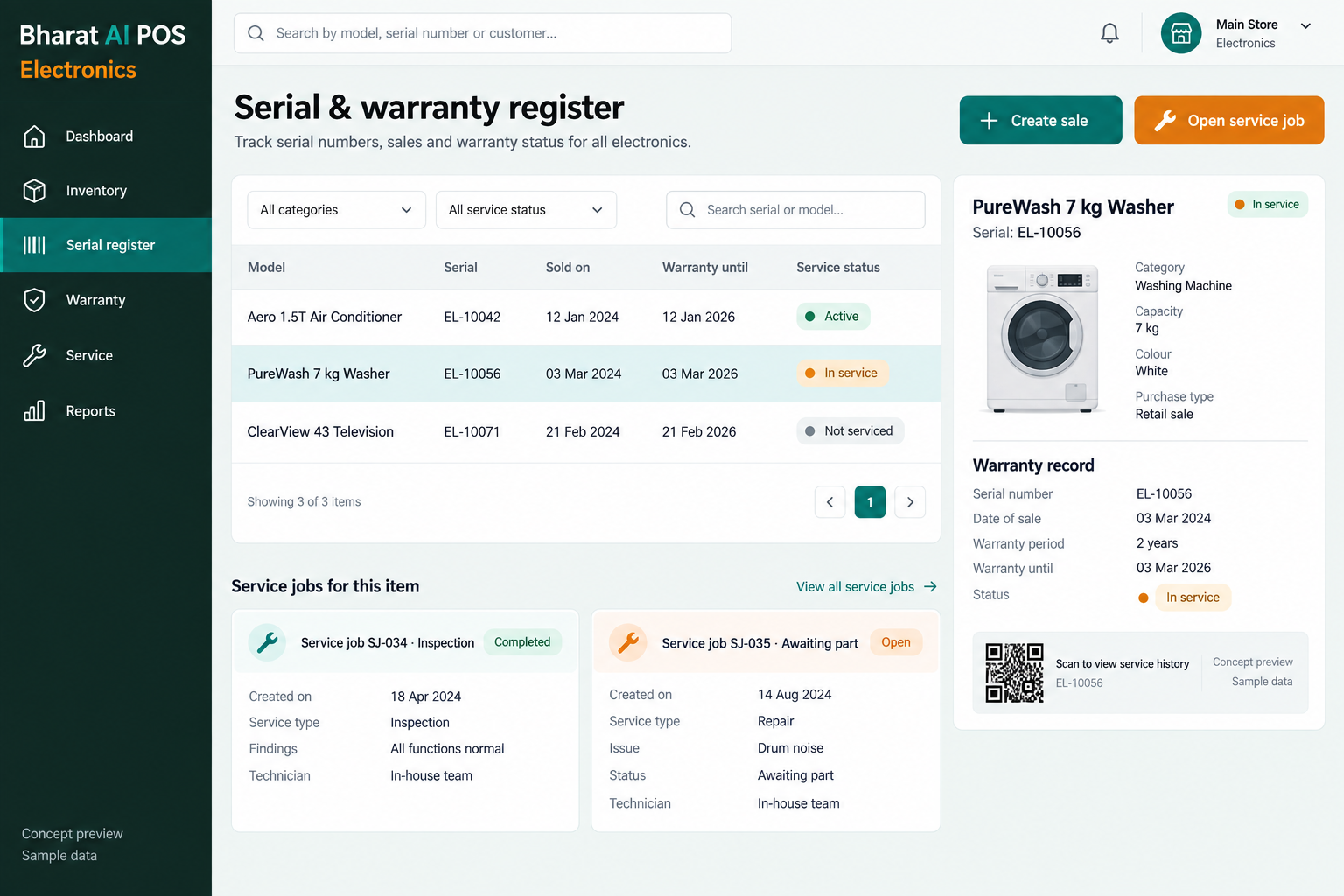
Illustrative interface with sample data. Select the image to explore it at full size.

BUILT FOR YOUR BUSINESS

A better fit for your daily work.

Electronics showrooms
Electrical product retailers
Home appliance shops
Electronics businesses with multiple branches

Each unit has its own identity

Two appliances may share a model but have different serial numbers. The sale needs enough detail to identify the unit supplied to the customer.

After-sales enquiries need context

Warranty questions and service requests continue after checkout. Serial and warranty tracking with service job cards helps staff organise the information needed for follow-up.

Brand totals hide model demand

A showroom may hold many units of one brand while missing the requested model. Model-wise stock gives a more useful view for buying decisions.

SOFTWARE CAPABILITIES

Everything your team needs, connected.

01

Brand and model inventory

Organise product availability by brand and model. Clear naming helps sales staff distinguish similar products and makes the stock view useful during customer enquiries.

02

Serial number tracking

Track the identifier of the specific unit involved in a sale. Practise serial entry and verification with representative products before the showroom goes live.

03

Warranty tracking

Keep warranty information connected to the product record and sales process. Confirm the fields required for your brands; warranty terms remain those of the relevant provider.

04

Service job cards

Use job cards to organise service work. Review the information your sales and service teams need when a customer returns with a product enquiry.

05

EMI and exchange billing

Support the billing process for EMI and exchange sales. Demonstrate the arrangements you use and confirm any specific finance-provider connection before agreeing the setup.

06

Business and customer tools

Combine GST billing, payments, loyalty and WhatsApp e-bills with sales analytics. Multi-branch sync and the owner app support oversight across the showroom business.

HOW IT WORKS

From the first task to a clearer daily picture.

01

Prepare brand and model records

Set up a catalogue that reflects the way staff search for products. Include the serial and warranty information required for representative units.

02

Confirm the selected unit

Check the model, price and actual serial number before completing the sale. The transaction should identify the unit being supplied to the customer.

03

Complete the billing arrangement

Follow the demonstrated normal, EMI or exchange workflow. Record payment information and issue the customer’s bill with the agreed product and GST details.

04

Handle after-sales follow-up

Review serial and warranty information when the customer returns. Use the service job-card process to organise the details your service team needs.

05

Review showroom stock

Compare model-wise availability with sales patterns and reorder suggestions. The buyer decides the next order after considering supplier availability and changes in customer demand.

AI ASSISTANCE

Useful insights. Your team in control.

Use forecasts and alerts to guide your review, with people making the final decisions.

Demand forecasts

Use sales history to review likely product demand. Combine forecasts with upcoming launches, local buying patterns and the models currently held in stock.

Reorder suggestions

Identify stock that may need replenishing and inspect the underlying sales pattern. The owner chooses suppliers and quantities after reviewing the showroom’s priorities.

Nightly sales summary

Receive a daily overview of sales and stock points. Tamil and English voice billing and WhatsApp smart offers support staff and customer communication.

REPORTS AND VISIBILITY

A clear view of what matters.

Brand and model stock

Review product availability at a level useful to sales staff. Compare the stock view with the models customers are asking about.

Serial and warranty review

Inspect a sample product’s serial and warranty details. Confirm any dedicated report or export format needed by your showroom during the demo.

Product sales activity

Understand which models contribute to sales before placing the next order. Use that information alongside the remaining stock and available display space.

Collections and outlets

Use payment reconciliation and synchronised branch reports in the daily review. The owner app keeps sales and stock accessible away from the showroom.

EQUIPMENT AND SETUP

Made to work with the right tools.

Bring your existing equipment details. We’ll review compatibility, connectivity and the modules needed for your installation.

YOUR SETUP CHECKLIST
GETTING STARTED

A practical plan for moving forward.

01

Review representative products

Bring different brands and models with serial and warranty details. Show a typical sale and service enquiry so the operating requirements are clear.

02

Prepare opening records

Import items, customers and stock. Review existing serial and warranty data with a sample export before agreeing the migration approach.

03

Train sales and service staff

Practise serial verification, billing and job-card creation together. Demonstrate the actual EMI and exchange arrangements your showroom uses.

04

Check early transactions

Review sample sales and service handoffs after launch. Use model sales and stock information in the buyer’s regular replenishment discussion.

COMMON QUESTIONS

Before you choose your software.

Can the system track serial numbers and warranties?

Yes. Serial number and warranty tracking are electronics capabilities. Bring actual products to confirm the fields and the sales-to-service workflow during the demo.

Brand and model-wise stock is supported. Agree clear names and identifiers during catalogue preparation so staff can distinguish similar products and review availability.

No. Warranty tracking records relevant information; it does not guarantee manufacturer approval or repair coverage. Confirm any required claim-handling process separately during the demonstration.

EMI and exchange billing are supported. Share your actual arrangements so the team can demonstrate the process and confirm any specific provider connection you require.

Service job cards are part of the electronics use case. Show the information your service staff need so the job-card and customer handoff process can be demonstrated.

LET’S TALK ABOUT YOUR BUSINESS

See your workflow in action.

Bring your real tasks and questions. We’ll use them to discuss the right configuration, equipment and rollout.

A USEFUL STARTING POINT
KEEP EXPLORING

More ways to support your business.

BHARAT AI POS

Keep handset sales, IMEI details and service follow-up connected with Bharat AI POS for mobile stores.

BHARAT AI POS

Handle boxes, pieces, kilograms and metres with a stock and billing process built around trade sales.

BHARAT AI POS

Run your shop with a connected view of billing, stock and customers.