BHARAT AI POS • FOOTWEAR STORES

Footwear Billing and Size Inventory Software

See the sizes you can actually sell with Bharat AI POS for footwear stores. A size-wise stock matrix, barcode labels for every pair, exchange and return billing, and AI low-size alerts help staff connect customer requests with available stock and clearer replenishment decisions.
● ● ●
Footwear Billing and Size Inventory Software
CONCEPT PREVIEW

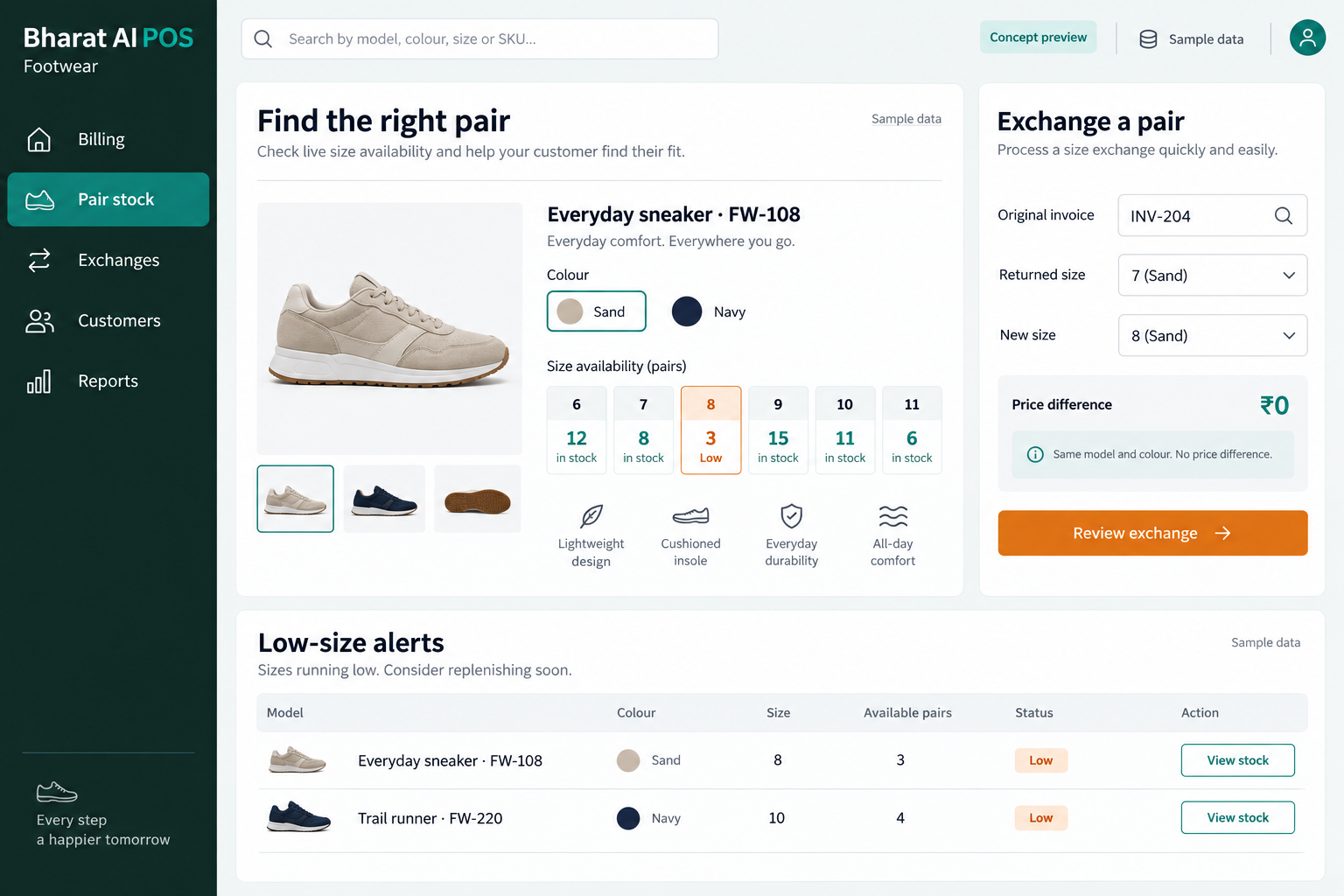
Illustrative interface with sample data. Select the image to explore it at full size.

BUILT FOR YOUR BUSINESS

A better fit for your daily work.

Independent shoe shops
Family footwear showrooms
School and work footwear retailers
Footwear chains with multiple outlets

Popular sizes disappear first

A model can still show several pairs while the size most customers request is missing. Size-level visibility matters more than the overall model total.

Boxes look similar at checkout

Similar models and sizes can confuse a busy counter. A distinct barcode for each pair helps staff verify what the customer is buying.

Exchanges must stay connected to stock

A customer may return for another size after trying a pair at home. The exchange and return workflow should be understood before trading starts.

SOFTWARE CAPABILITIES

Everything your team needs, connected.

01

Size-wise stock matrix

Review footwear availability by size within the range. Staff can identify gaps and discuss the right replenishment mix instead of ordering from model totals alone.

02

Barcode labels for each pair

Use pair-level barcode labels to identify products at the counter. Confirm the model and size shown on the bill before handing the purchase over.

03

Exchange and return billing

Handle footwear exchanges and returns within the billing process. Demonstrate your store policy and the stock effect of a size exchange during setup.

04

GST and daily collections

Bring GST details and payment records into your counter routine. Payment reconciliation supports the owner’s review of cash, UPI, card and credit sales.

05

Customer loyalty

Keep customer records and loyalty activity connected with purchases. WhatsApp e-bills and smart offers support communication after the customer leaves the showroom.

06

Branch and mobile oversight

Use multi-branch sync to review stock, prices and reports across locations. The owner app provides sales and AI alerts away from the shop.

HOW IT WORKS

From the first task to a clearer daily picture.

01

Organise styles and sizes

Prepare consistent model names and size labels before loading stock. Make the catalogue reflect how your staff search for footwear on the sales floor.

02

Review customer availability

Use the size-wise view when a customer asks for a particular pair. Check the actual model and size rather than relying on total stock.

03

Scan and bill the pair

Scan the barcode, verify the selected footwear and record payment. Issue the receipt and send the WhatsApp e-bill using the agreed customer process.

04

Process a size exchange

Follow the demonstrated exchange workflow under your store policy. Check the returned pair and replacement size so billing and inventory remain understandable to staff.

05

Plan the next size mix

Review low-size alerts and selling patterns. The buyer decides which sizes to replenish after considering supplier availability, seasonality and the stock already held.

AI ASSISTANCE

Useful insights. Your team in control.

Use forecasts and alerts to guide your review, with people making the final decisions.

Low-size alerts

AI alerts identify sizes running low so the team can investigate before placing the next order. Review the underlying availability and current customer demand.

Sales-led replenishment

Use sales forecasts and reorder suggestions to support buying decisions. Apply your knowledge of school seasons, local preferences and supplier lead times before ordering.

Daily owner summary

The nightly AI summary brings sales and stock points into one review. Voice billing in Tamil and English offers another entry method for trained cashiers.

REPORTS AND VISIBILITY

A clear view of what matters.

Size availability

See the size matrix for your footwear range. Identify gaps that are easy to miss when looking only at model-level quantities.

Product sales patterns

Review which pairs are selling and compare the pattern with remaining stock. Use the findings when discussing the next supplier purchase.

Exchange workflow review

Review sample exchange and return transactions with staff. Confirm any dedicated return-report requirement during the demo so the final setup meets your needs.

Outlet and collection overview

Use synchronised branch reports and payment reconciliation to review sales activity. Discuss both stock gaps and daily collections with each outlet manager.

EQUIPMENT AND SETUP

Made to work with the right tools.

Bring your existing equipment details. We’ll review compatibility, connectivity and the modules needed for your installation.

YOUR SETUP CHECKLIST
GETTING STARTED

A practical plan for moving forward.

01

Bring representative pairs

Choose models with different sizes and price points. Agree how staff should identify them in the stock matrix and at the counter.

02

Validate opening stock

Import items and quantities, then check each size against physical stock. Resolve naming differences before the catalogue becomes the daily reference.

03

Practise sales and exchanges

Train staff with a normal sale followed by a size exchange. Confirm the resulting billing and stock process matches your store policy.

04

Establish buying reviews

Assign responsibility for low-size alerts and replenishment. Review sales history alongside customer requests to keep the size mix under consideration.

COMMON QUESTIONS

Before you choose your software.

Can we see stock by footwear size?

Yes. A size-wise stock matrix is a footwear feature. Bring a range of your own sizes to confirm the catalogue and display during the demo.

Barcode labels for every pair are part of the footwear use case. The team can demonstrate labelling and scanning with your selected products and compatible printer.

Exchange and return billing are supported. Your store determines the return policy; use a realistic exchange during training to verify the billing and stock steps.

They highlight sizes running low for the buyer to review. Your team still decides quantities based on actual demand, the season and supplier availability.

Multi-branch synchronisation supports shared stock, price and report visibility. Discuss your outlet and counter structure to configure the appropriate management view and staff access.

LET’S TALK ABOUT YOUR BUSINESS

See your workflow in action.

Bring your real tasks and questions. We’ll use them to discuss the right configuration, equipment and rollout.

A USEFUL STARTING POINT
KEEP EXPLORING

More ways to support your business.

BHARAT AI POS

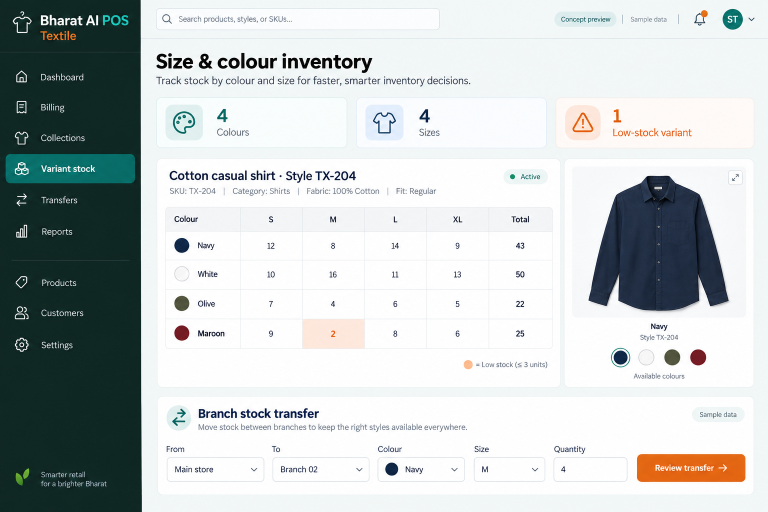
Keep sizes, colours and seasonal collections visible from the sales floor to the owner’s phone.

BHARAT AI POS

Run your shop with a connected view of billing, stock and customers.

BHARAT AI POS

Keep packaged groceries, weighed products and everyday essentials in one billing and inventory workflow.