/
/
/
Restaurant
BHARAT AI POS • RESTAURANTS & CAFÉS

Restaurant POS and Kitchen Billing Software

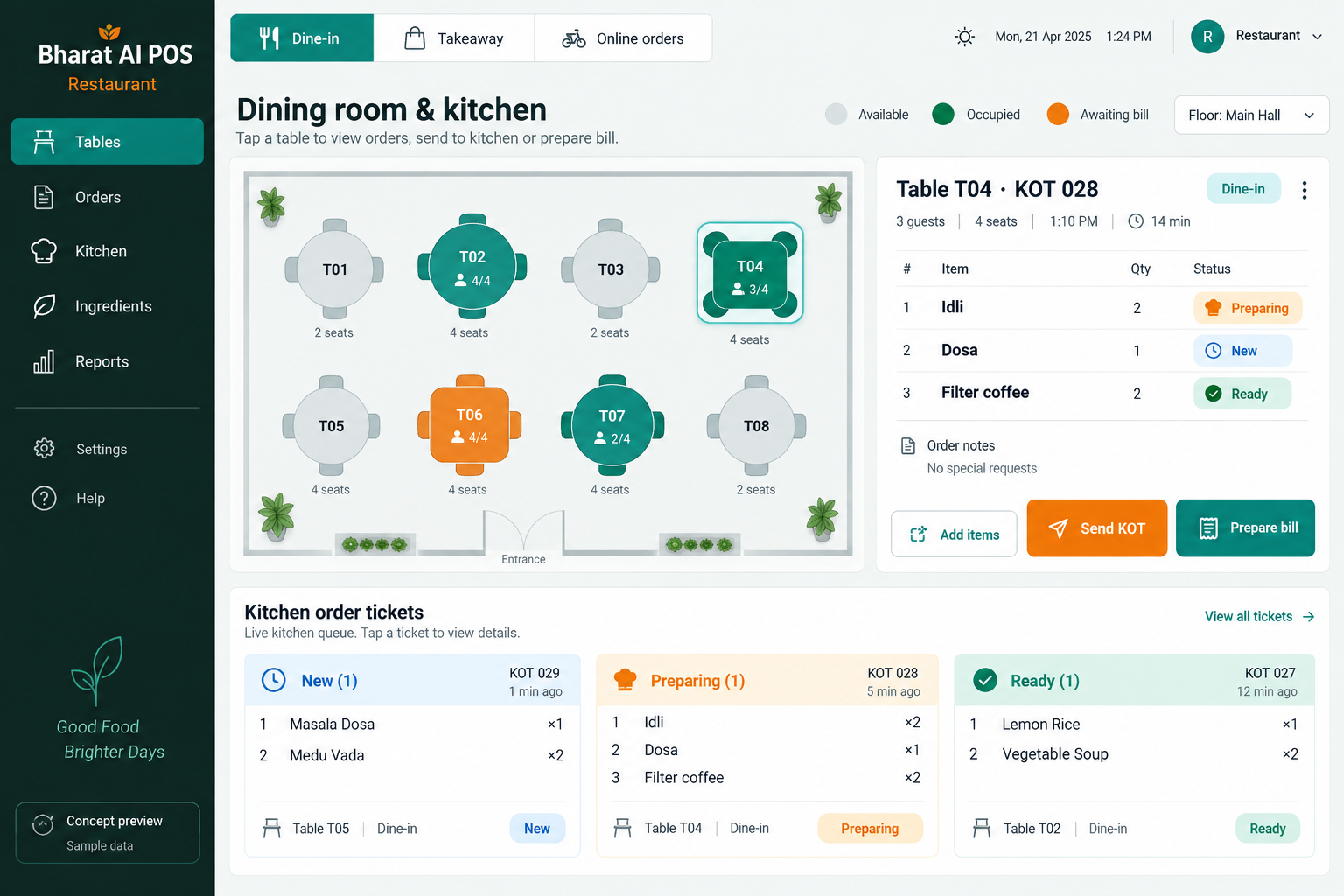
Connect the dining room, takeaway counter and kitchen with Bharat AI POS. Table, takeaway and online-order billing with KOT, recipe-level stock deduction and dish-demand forecasts help restaurants understand sales and ingredient use while giving owners a clearer view of the day’s business.
● ● ●
Restaurant POS and Kitchen Billing Software
CONCEPT PREVIEW

Illustrative interface with sample data. Select the image to explore it at full size.

BUILT FOR YOUR BUSINESS

A better fit for your daily work.

Dine-in restaurants
Cafés and quick-service outlets
Takeaway food businesses
Restaurant groups with multiple branches

Orders arrive through different channels

Table, takeaway and online orders compete for attention. A connected routine keeps each order clear through preparation and checkout.

Ingredients disappear behind dish sales

Each dish consumes several ingredients. Recipe-level deduction connects menu sales with stock and informs the kitchen requirements review.

Tomorrow's preparation is hard to judge

Preparation needs to reflect likely demand. Dish forecasts give the chef and owner another input when planning tomorrow.

SOFTWARE CAPABILITIES

Everything your team needs, connected.

01

Table and takeaway billing

Organise restaurant sales around table and takeaway workflows. Demonstrate your normal service sequence so the order entry and billing process fits how your team serves customers.

02

Kitchen order tickets

KOT supports the handoff from order taking to preparation. Confirm the kitchen output, device arrangement and staff process during the demo using a representative customer order.

03

Online-order billing

Include online orders in the restaurant’s billing workflow. Discuss the actual order sources you use and confirm any required connections before agreeing the final operating setup.

04

Recipe-level inventory

Link dish sales to recipe-level stock deduction. Consistent recipe quantities and item units make the inventory view more useful when reviewing ingredient availability and planning the next purchase.

05

Customer engagement

Use CRM, loyalty, WhatsApp e-bills and offers to support repeat visits. WhatsApp ordering chatbot capability can be discussed as part of the restaurant’s customer enquiry and order journey.

06

Accounts and owner oversight

Bring GST billing, sales analytics and payment reconciliation into the closing routine. The owner app and multi-branch sync keep restaurant information available beyond a single billing counter.

HOW IT WORKS

From the first task to a clearer daily picture.

01

Prepare the menu and recipes

Set up the menu items and the ingredient quantities used for them. Review names and units with kitchen staff before relying on stock deductions for planning.

02

Take the customer order

Follow the appropriate table, takeaway or online-order workflow. Staff check dish quantities and the order details before sending information through the agreed kitchen process.

03

Coordinate kitchen preparation

Use KOT as the operational link between order entry and the kitchen. During training, rehearse who checks each ticket and how the team handles a change.

04

Complete the bill

Review the final order and GST details, record payment and issue the receipt. Send a WhatsApp e-bill where the customer uses that communication channel.

05

Plan tomorrow's kitchen

Review dish sales, ingredient stock and demand forecasts. Combine the software’s view with the chef’s knowledge of bookings, local events and supplies before choosing preparation quantities.

AI ASSISTANCE

Useful insights. Your team in control.

Use forecasts and alerts to guide your review, with people making the final decisions.

Tomorrow's dish demand

Forecast dish demand from sales history. The kitchen considers events, menu changes and preparation capacity when choosing final quantities.

Replenishment decisions

Review ingredient availability and replenishment suggestions. The restaurant decides purchase quantities, suppliers and delivery timing.

Daily restaurant overview

Review sales and stock points before the next shift. Tamil and English voice billing offers another option for counter staff.

REPORTS AND VISIBILITY

A clear view of what matters.

Dish sales

See which menu items are contributing to sales. Use those patterns when discussing ingredient buying and preparation priorities with the kitchen team.

Ingredient stock

Review the inventory picture supported by recipe-level deduction. Compare it with physical kitchen checks so recipe quantities and actual use stay aligned.

Daily collections

Review sales and payment reconciliation as the restaurant closes. Agree responsibility for checking cash, UPI, cards and any credit sales.

Branch activity

Use synchronised sales, stock and reports to discuss activity across outlets. The owner app provides a practical overview away from the restaurant.

EQUIPMENT AND SETUP

Made to work with the right tools.

Bring your existing equipment details. We’ll review compatibility, connectivity and the modules needed for your installation.

YOUR SETUP CHECKLIST
GETTING STARTED

A practical plan for moving forward.

01

Walk through a service period

Show how dine-in, takeaway and online orders arrive. Agree the path from order entry through kitchen preparation to payment.

02

Prepare menu and recipe data

Collect menu names, prices and ingredient quantities. Review units and demonstrate recipe variations before finalising the setup.

03

Train front and back of house

Rehearse an order with counter and kitchen staff together. Check KOT output, final billing and the staff handoff.

04

Review the first services

Compare sales, stock movement and collections with your records. Refine data quality and review forecasts as sales history develops.

COMMON QUESTIONS

Before you choose your software.

Can we handle tables and takeaway in the same system?

Yes. Table, takeaway and online-order billing with KOT are restaurant capabilities. Demonstrate your service process so the team can show the relevant workflow clearly.

It connects menu sales with the ingredients assigned to each recipe. The stock view becomes more useful when recipe quantities and units are maintained accurately by the restaurant.

Online-order billing is supported, but specific platform connections are not confirmed here. Share the platforms you use and ask the team to demonstrate each required connection.

It provides dish-demand forecasts to support planning. Your chef and manager choose final preparation quantities after considering bookings, freshness, staffing, events and the ingredients available.

A WhatsApp ordering chatbot is included in the restaurant use cases. Discuss the menu, order capture and staff handoff you need so the complete customer journey is demonstrated.

LET’S TALK ABOUT YOUR BUSINESS

See your workflow in action.

Bring your real tasks and questions. We’ll use them to discuss the right configuration, equipment and rollout.

A USEFUL STARTING POINT
KEEP EXPLORING

More ways to support your business.

BHARAT AI POS

Manage piece sales, weighed sweets and daily stock with Bharat AI POS for bakeries.

BHARAT AI POS

Keep packaged groceries, weighed products and everyday essentials in one billing and inventory workflow.

BHARAT AI POS

Run your shop with a connected view of billing, stock and customers.